serafex

Serafex · Seraf EX: your executive team

Your company’s AI executive team

Seraf, your AI assistant, and its executive Council prepare your company’s decisions with your Google or Microsoft tools, then bring you one clear recommendation. You decide.

Works withGoogle WorkspaceMicrosoft 365

Got a burning question?Want to talk it over?

  • Unread
    emails
    3to read
  • Meetings
    this week
    2confirmed
  • Today’s
    tasks
    4to do
  • Invoices
    to pay
    1unpaid

Your workspace

Your Workspace,
command centre.

Each pill opens a space: calendar, documents, messaging, project tracking, content. Seraf stays at the centre, ready to answer.

Explore the platform

Demo · rebuilt from the App’s code · labels translated · sample data

01 · Day to day

What Seraf prepares for you.

  1. Demo screenshot, labels in French: the Workspace home: Seraf’s orb at the centre, the spaces in orbit, the question for Seraf and four tiles, unread emails, appointments this week, today’s tasks and invoices to pay.

    Home

    See the page

    Your day is waiting, already prepared: Seraf’s brief, today’s numbers and your spaces one click away.

    Seraf
    1. Every morning, I prepare your brief: what changed and what awaits your decision. You read it or listen to it.
    2. Your day in four numbers: emails to read, appointments this week, today’s tasks and invoices to pay.
    3. Around me, your spaces: Messaging, Calendar, Documents, Email… One click and you are there.
    4. A question, an idea? Type it here or say it out loud: let’s talk it through.
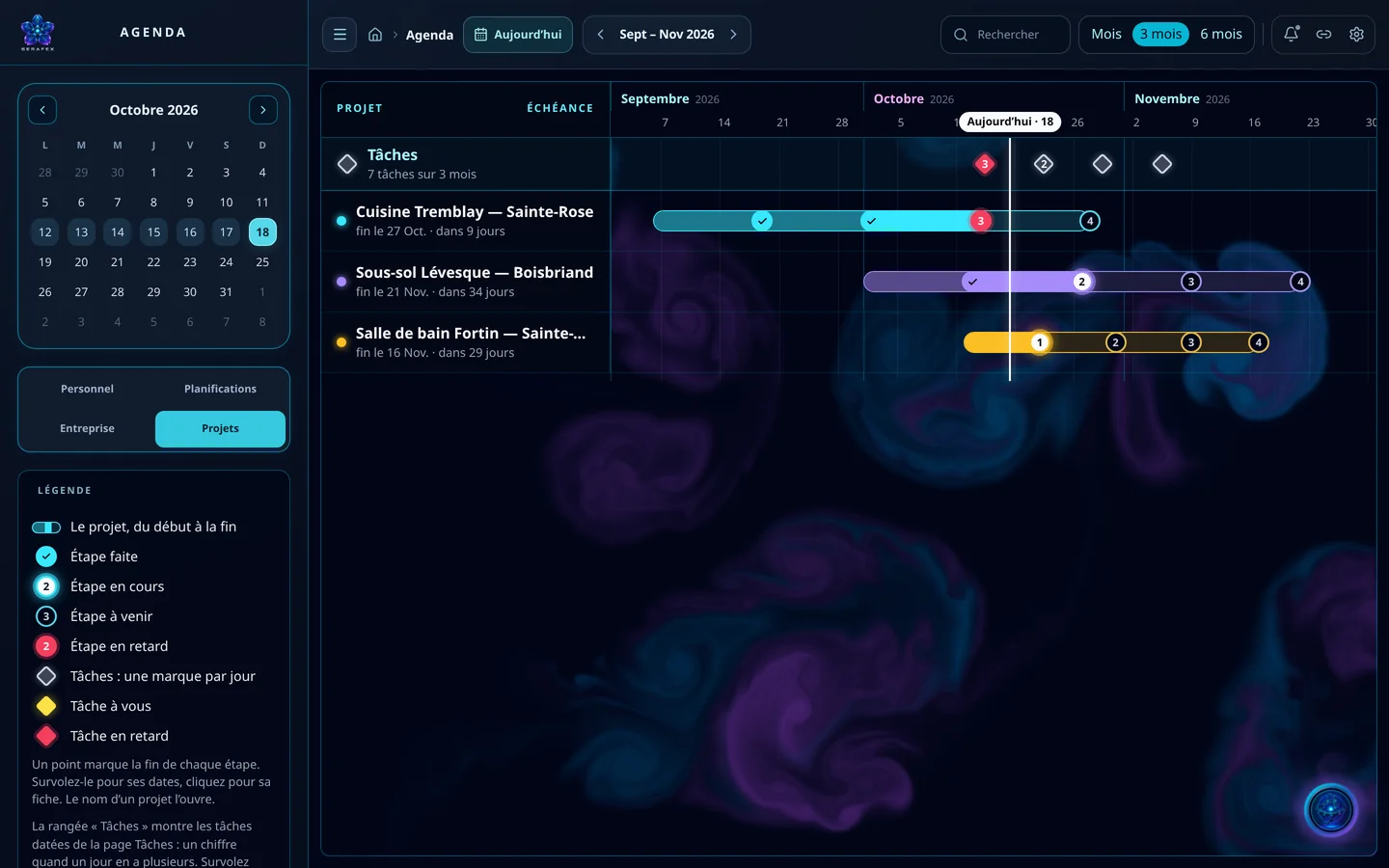
  2. Demo screenshot, labels in French: the Calendar in Projects mode: three job sites on a September to November timeline, their steps and the tasks row.

    Calendar

    See the page

    Your appointments, tasks and projects on the same timeline, step by step.

    Seraf
    1. Each project on its own line, from start to finish: steps done, in progress, upcoming or late.
    2. The Tasks row puts your dated tasks next to your projects, one mark per day.
    3. Today’s line shows where each project stands, at a glance.
    4. Personal, Schedules, Company, Projects: the same page, four ways to see your time.
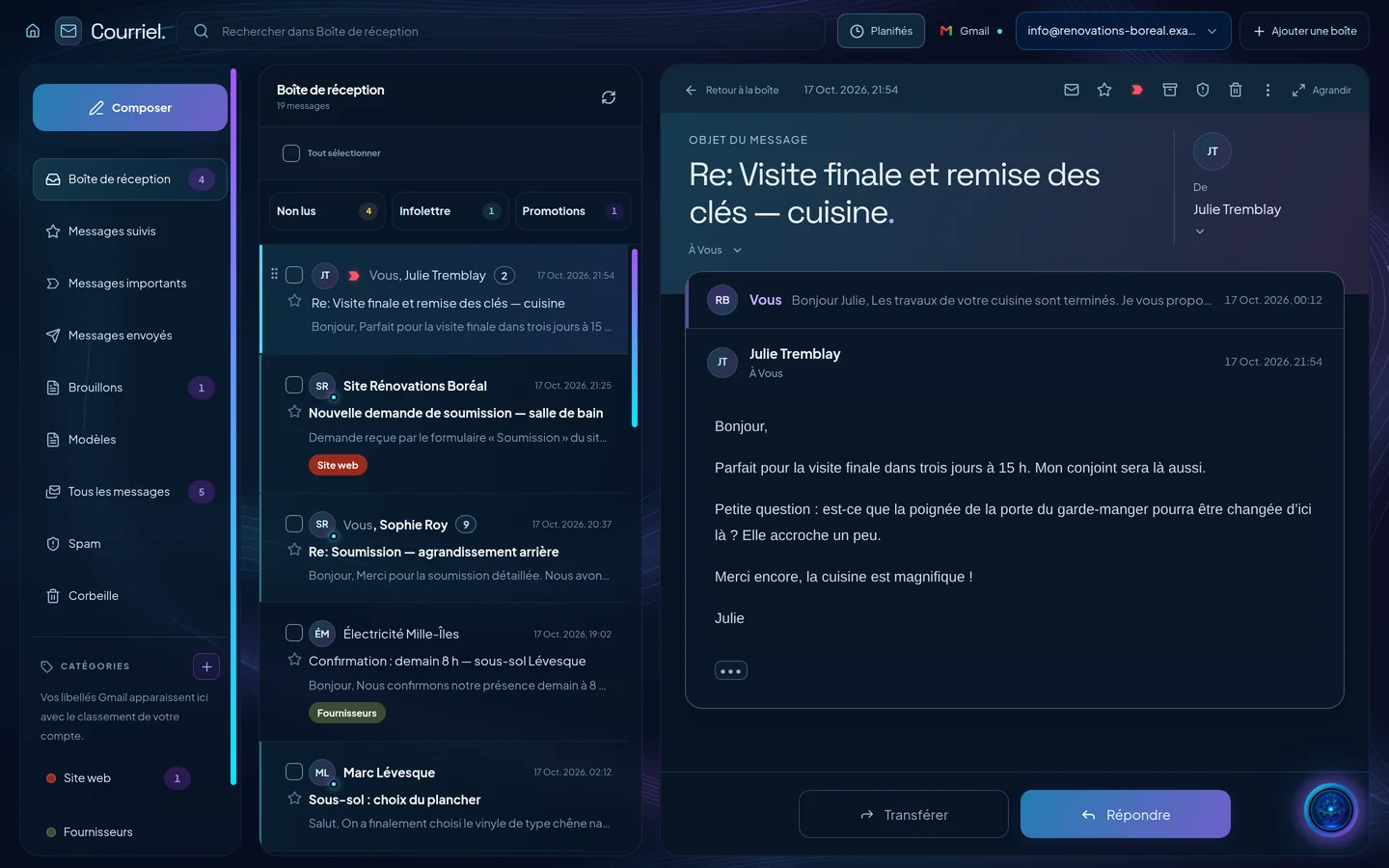
  3. Demo screenshot, labels in French: Email: a fictional company’s inbox and an open conversation with a client, with the Forward and Reply buttons.

    Email

    See the page

    Your Gmail or Outlook inbox, no new address: sorted for you, with your replies already drafted.

    Seraf
    1. Unread, Newsletter, Promotions: your inbox sorts itself, and replies to your newsletters have their own place.
    2. One conversation at a time, as in Gmail: your message and the client’s reply, in the same thread.
    3. I prepare a draft reply; you review it. Nothing is sent without your confirmation.
    4. Your Gmail labels stay yours: Website, Suppliers… your account’s filing, as is.
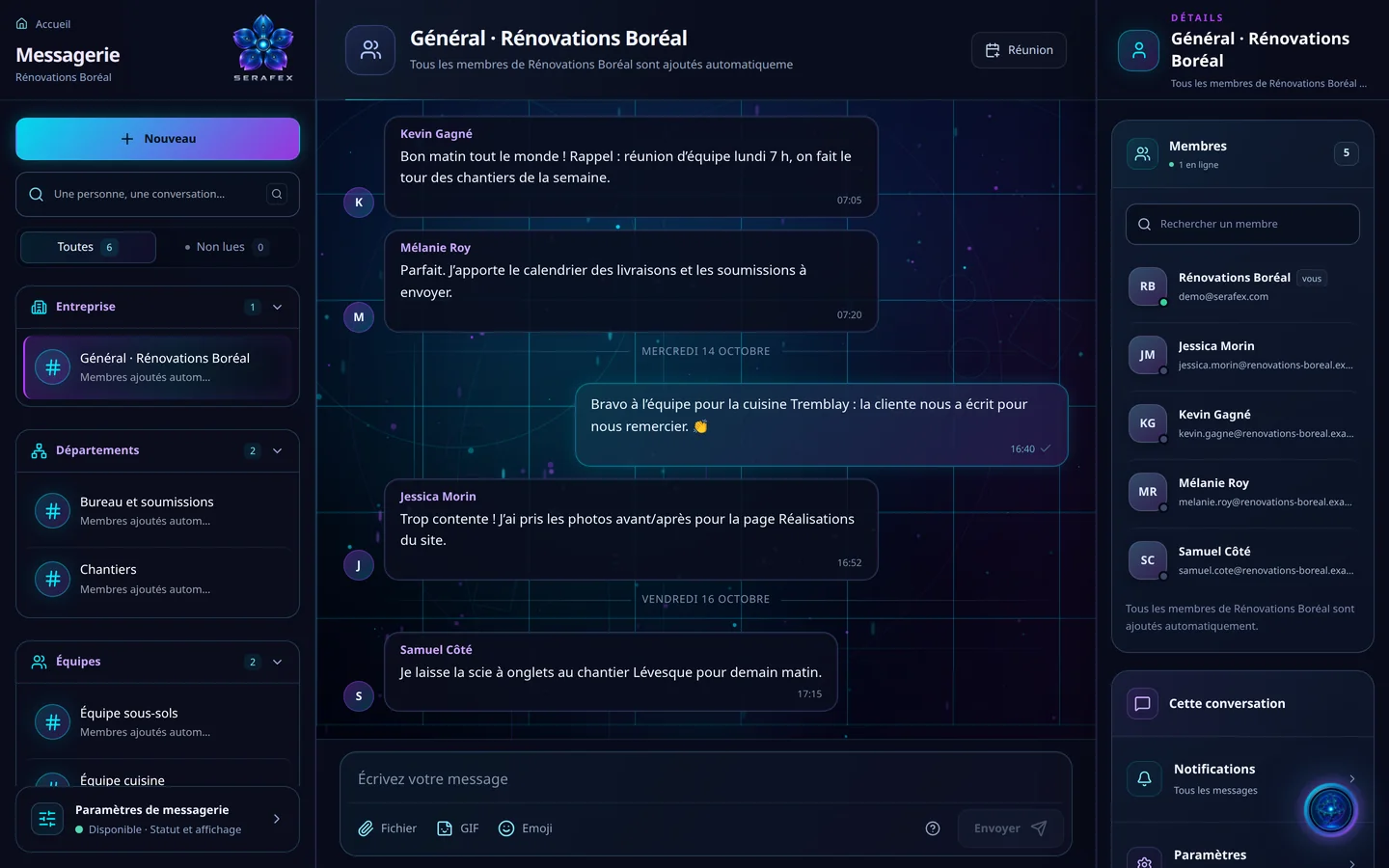
  4. Demo screenshot, labels in French: Messaging: the General channel of a fictional renovation company, its departments, teams and members.

    Messaging

    See the page

    Your whole team in one place: departments, teams and private conversations, each thread with its context.

    Seraf
    1. One channel for the whole company, one per department, one per team: everyone is added automatically.
    2. Reminders, deliveries, job site photos: the team talks here, and each thread keeps its context.
    3. Who is in the conversation, who is online: it is all in the details panel.
    4. Attach a file, a GIF or an emoji. Here, your colleagues answer, not me.
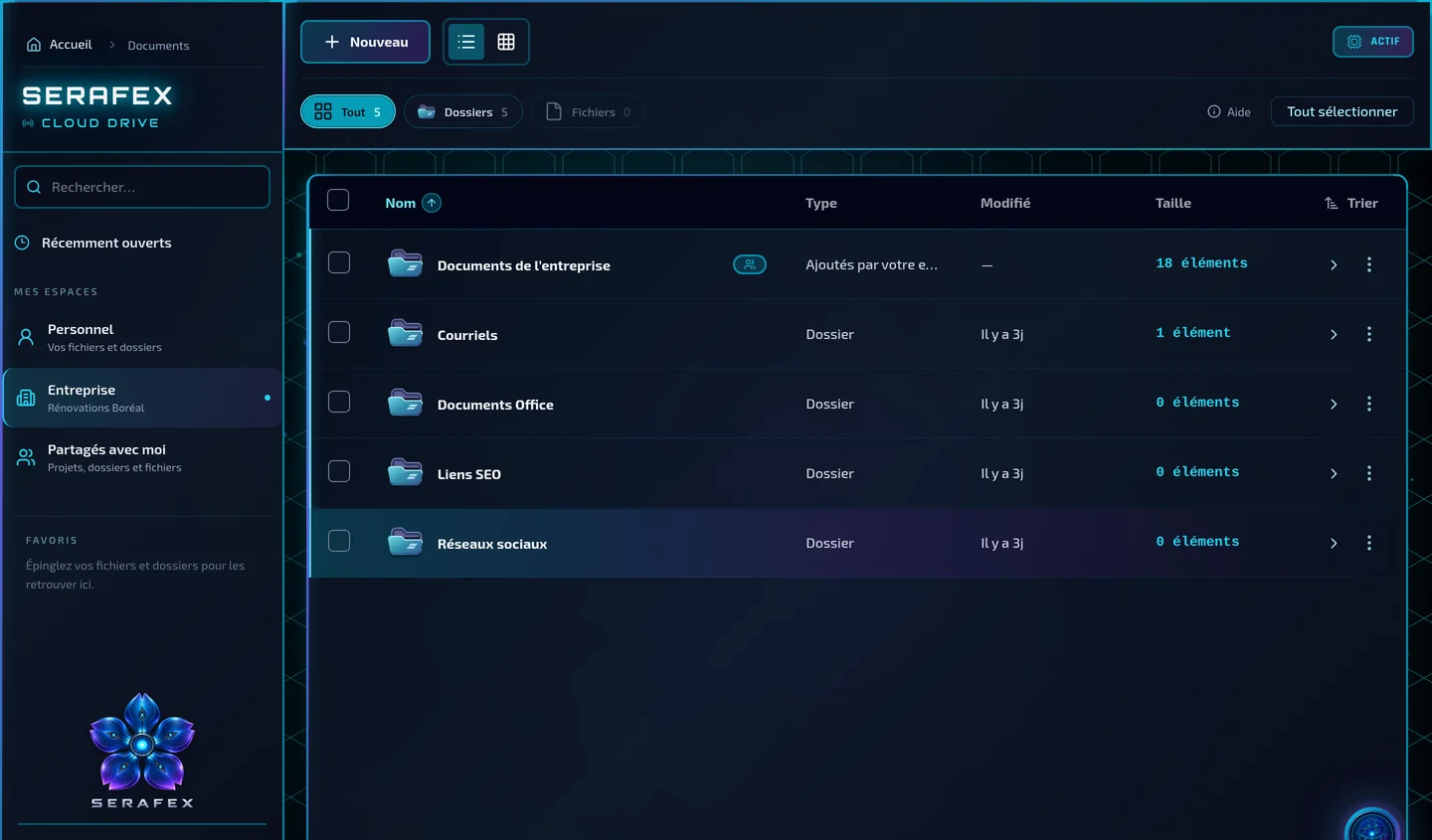
  5. Demo screenshot, labels in French: Documents, Company space: a fictional company’s folders, with their type, date and number of items.

    Documents

    See the page

    All your company files, organized and found in one click, on your Google Drive or OneDrive.

    Seraf
    1. Your Personal space, the company’s and what others share with you: you decide who sees what.
    2. The company’s folders, sorted by topic: documents, emails, SEO links, social media.
    3. One click filters the list: everything, folders or files.
    4. A note, a document, a spreadsheet or a presentation is created here, right in the right folder.
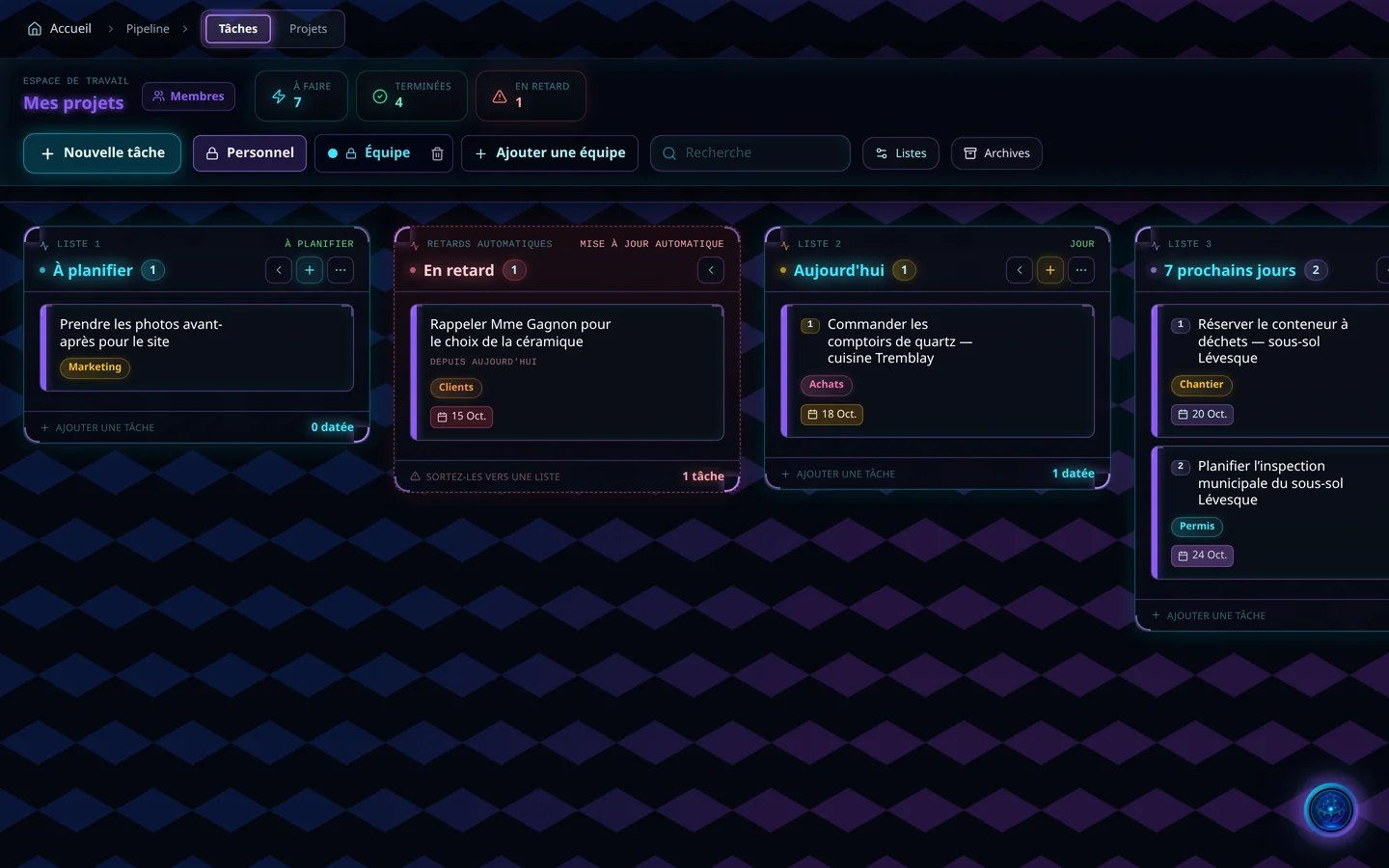
  6. Demo screenshot, labels in French: the Pipeline: the To plan, Overdue, Today and Next 7 days lists of a fictional company.

    Pipeline

    See the page

    Your team’s work, task by task: delays flag themselves and every project moves forward in stages.

    Seraf
    1. A new task, for you alone or for the team: each one has its place.
    2. A task past its due date moves into Overdue by itself. No one has to look for it.
    3. The next 7 days, with each task’s tag: purchasing, job site, permits.
    4. To do, done, overdue: your numbers at the top of the page.
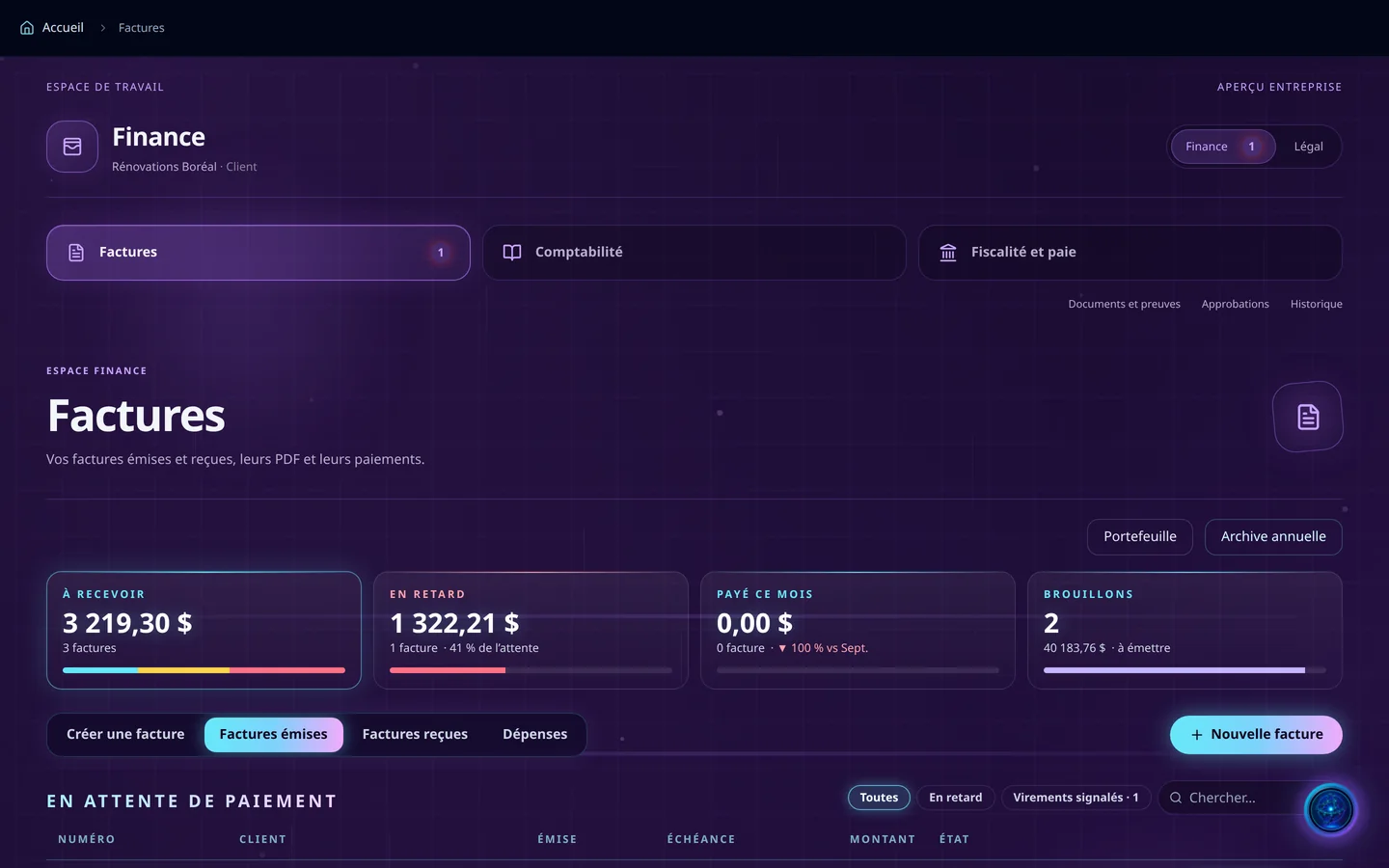
  7. Demo screenshot, labels in French: Finance, Invoices tab: a fictional company’s sample amounts to collect, overdue and in draft.

    Finances

    See the page

    Invoices, accounting, tax and payroll on a single page, with what awaits your decision.

    Seraf
    1. To collect, overdue, paid this month, drafts: your invoices in four numbers.
    2. Create an invoice, invoices sent, invoices received, your expenses: everything starts from the same page.
    3. Invoices, accounting, tax and payroll: each file keeps its documents, approvals and history.
    4. I prepare your invoice drafts; the decision belongs to the people allowed to approve.
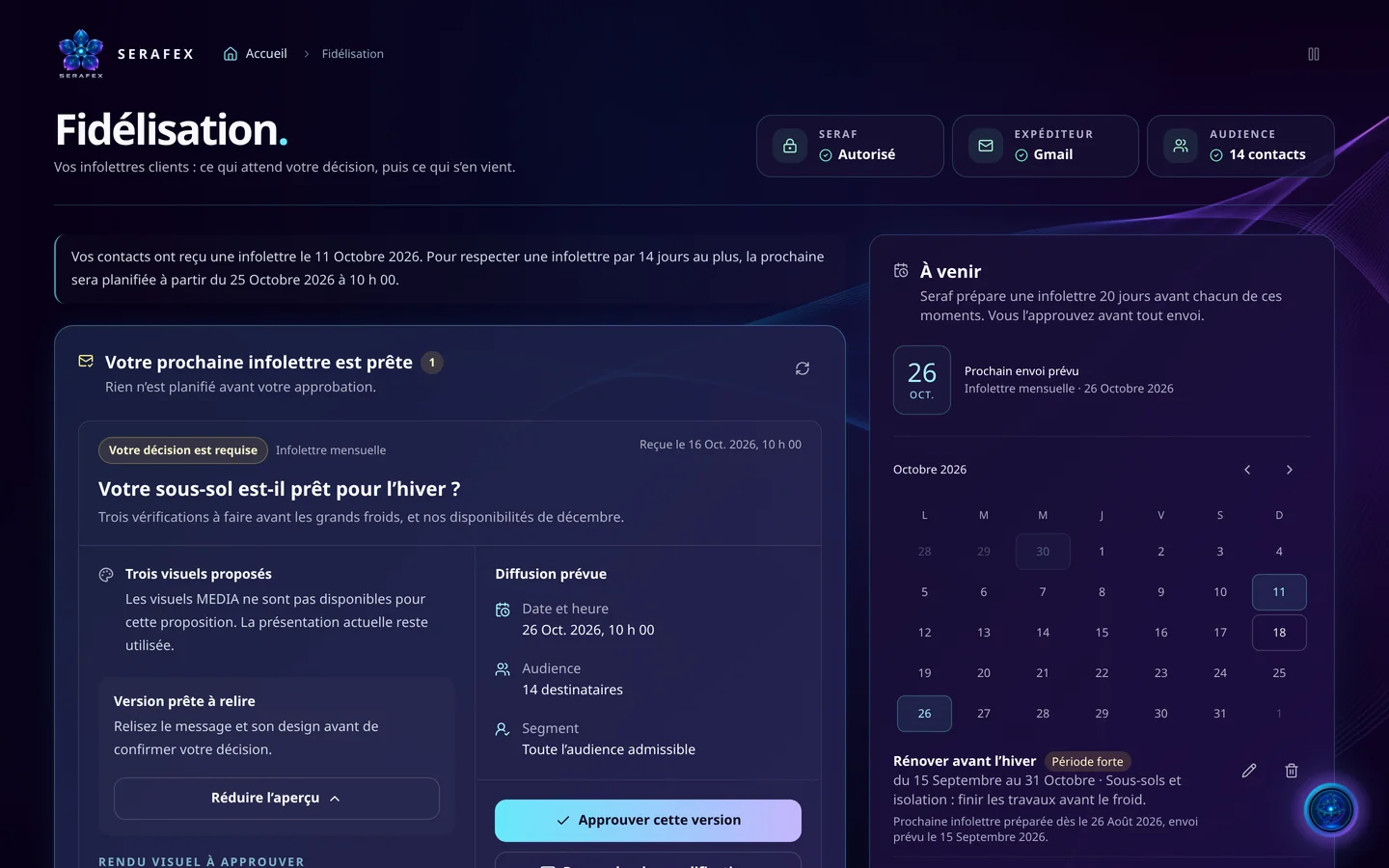
  8. Demo screenshot, labels in French: Loyalty: the newsletter ready to approve, its planned send and the calendar of key moments of a fictional company.

    Loyalty

    See the page

    A newsletter prepared before each of your key moments; you review it and you approve.

    Seraf
    1. Your next newsletter is ready: I prepared it, you review it with its design.
    2. I prepare a newsletter before each of your key moments, and the calendar shows the next send.
    3. Nothing goes out without your approval. You approve this version, or you ask for changes.
    4. My permission, your Gmail sender, your audience: the essentials at the top of the page.
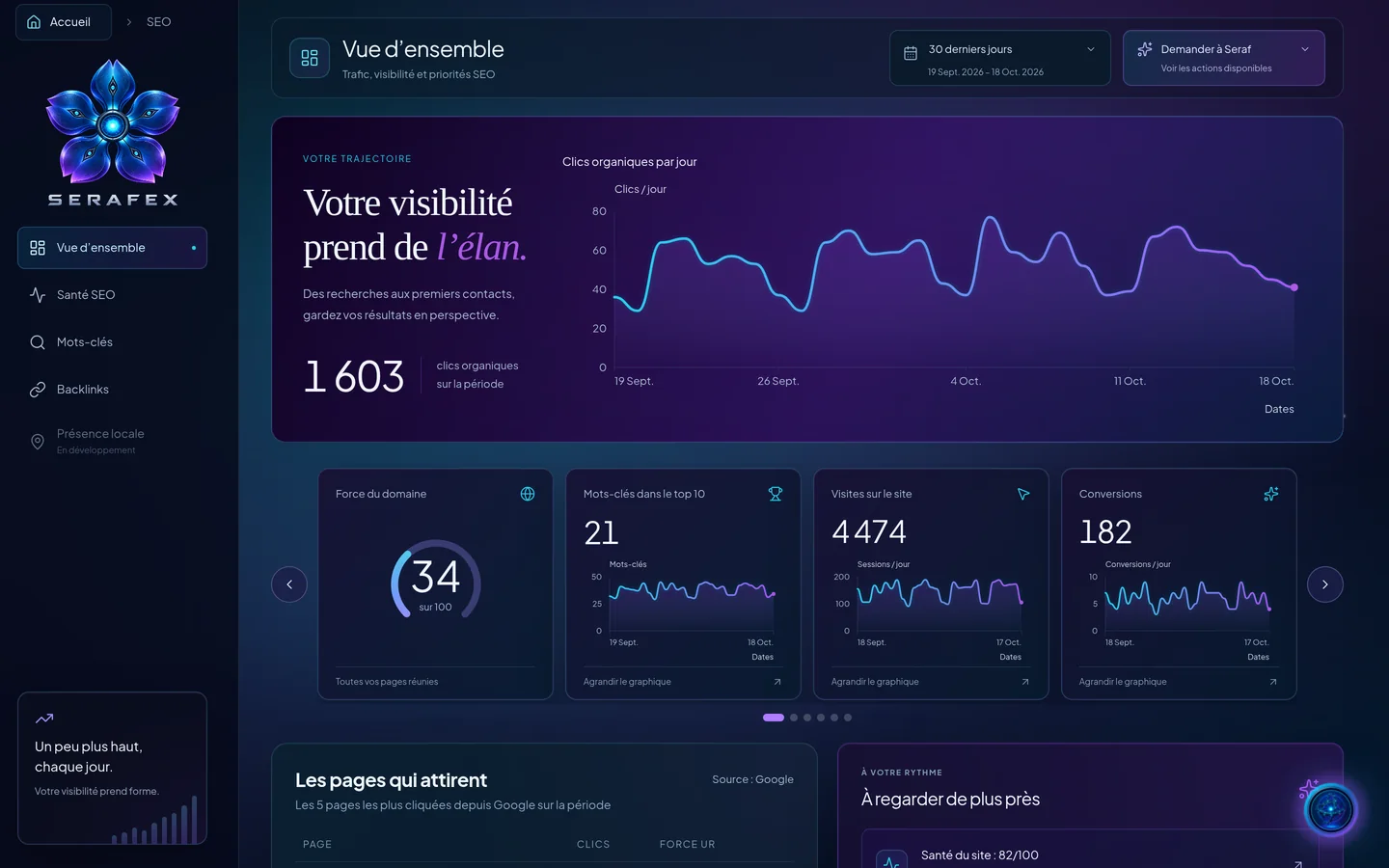
  9. Demo screenshot, labels in French: a fictional company’s SEO overview: the organic clicks curve over 30 days and four indicators.

    SEO

    See the page

    Your Google visibility in plain words: your clicks, keywords, links and your next priority.

    Seraf
    1. Your clicks in Google, day by day, over the last 30 days: you watch your visibility gain momentum.
    2. Domain strength, top 10 keywords, visits, conversions: the essentials in four boxes.
    3. SEO health, keywords, backlinks: your site audit for Google and for AI, point by point.
    4. And when you are unsure, ask me: I show you the possible actions.
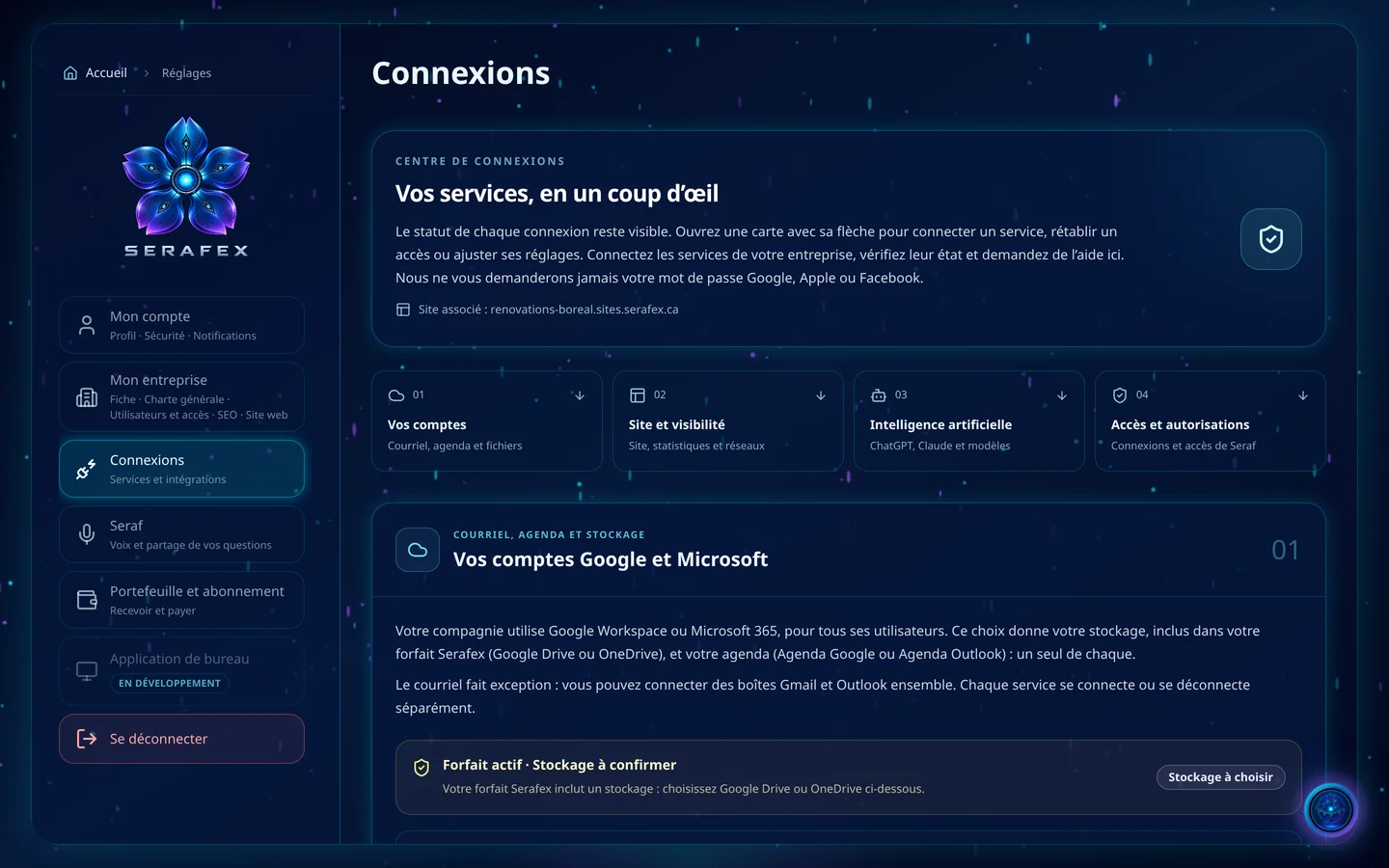
  10. Demo screenshot, labels in French: Settings, Connections: the status of each service and the Google and Microsoft accounts block.

    Settings

    See the page

    A single authorization links your email, calendar and files; you set the rest, Seraf included.

    Seraf
    1. Google Workspace or Microsoft 365: one choice for the whole company, and your storage and calendar follow.
    2. Your accounts, your site, artificial intelligence, my access: each connection shows its status.
    3. Your profile, your charter, your users and their access: each setting has its page.
    4. My voice and what I share of your questions: it is all set here.

02 · What sets us apart

More than ChatGPT or Claude: three forces, one orbit

Your own ChatGPT or Claude can run Seraf if you connect it; otherwise, Seraf uses the included model. So the difference isn’t the model: it’s everything that works around it.

  • Seraf and its Council think. Seraf first reads your facts, each with its source: invoices, calendar, Pipeline, documents. When the decision calls for it, it consults its Council: four personalities carrying 39 executive seats, from CEO to executive coach, and 288 working methods. Each one answers without seeing the others; when the options compete, they debate. You get one recommendation, disagreements included, with no invented numbers.
  • Six agents act, like a full team. The staff of a big company, working for yours. Neri, your chief of staff, keeps your email and your calendar. Aurel looks after your finances, Ordan your projects, Zadiel your contracts, Luma your website and Veya your loyal customers. Say what needs to move: they get to work in your Workspace, and all you have to do is say yes.
  • The workshops deliver, a team keeps watch. A website redesign, an SEO audit, blog articles, this week’s posts: specialist work goes to a workshop that does that one trade only. Another agent reviews every step, nothing is delivered without its evidence, and every job makes the workshop better. Every day, the Serafex team checks and improves the system.

A customer asks for a 15% discount on a three-year contract? A chat assistant answers with whatever you paste into it. Seraf gathers the contract and the customer’s invoices; Finance and legal works out the new total, taxes included, and notes that the contract renews automatically, a question for your lawyer before you sign. If you agree, Aurel prepares the next invoice at the new price, and it goes out when you click “Issue and send”.

03 · Your question, step by step

From your question to the finished work

You talk to Seraf the way you would talk to a colleague, in writing or out loud. It reads your facts first, consults its Council when the question calls for it, then answers you with one voice.

  1. You ask. “Is this the right time to hire?” or “Prepare the follow-up on overdue invoices”.
  2. Seraf reads the facts. Calendar, invoices, Pipeline, documents: it reads what the question depends on, and you follow its steps live.
  3. The Council, when needed. One view when one angle is enough, a debate when the options compete. A simple question skips it.
  4. One answer. Yes, not as is, or no, with the reason, the objections that remain and the next step.
  5. You decide. Seraf creates the task or the meeting, or hands the work to the right agent. Nothing goes out without your click.

You can stop Seraf at any time. The AI executive team page shows the Council at work, from the first view to the synthesis.

04 · Your tools, not another island

Google or Microsoft, with an executive team inside

Gmail or Outlook, the calendar, Drive or OneDrive: your tools hold everything, but you are still the one connecting them. Gemini, Copilot or ChatGPT help, only when you ask. Connect Google or Microsoft once: Seraf and its six agents get to work inside those same tools, and your company does its own follow-up instead of waiting for you.

  • A visitor writes on your Serafex site? The request lands in Gmail, tagged as coming from your website.
    A client replies to your newsletter with a question? It becomes a follow-up in Loyalty.
    A Meet meeting planned in Serafex? It is already in your Google Calendar, link and guests included.
    A file lost in Drive? Seraf finds it, files it or renames it.
  • A visitor writes on your Serafex site? The request lands in Outlook, tagged as coming from your website.
    A client replies to your newsletter with a question? It becomes a follow-up in Loyalty.
    A Teams meeting planned in Serafex? It is already in your Outlook calendar, with its guests.
    A file lost in OneDrive? Seraf finds it, files it or renames it.

The result: less running between your tools, more time for your company. In the morning, your brief is waiting. During the day, requests land where they belong and Seraf prepares what comes next. Whatever has to go out, an email or an invoice, waits for your green light. Your team keeps its tools; you keep the final say.

05 · Every morning

Your morning brief

Every morning, your Workspace home lets you know that your morning brief is ready. Under Seraf’s orb, four tiles give you the essentials: unread emails, today’s tasks, invoices to pay and this week’s appointments. Seraf can also read it to you out loud.

The brief also makes room for the Council’s work: overnight, the Council prepares a company brief, and its items are added to yours. For each item, you choose: go through it with Seraf, ask a question about it or handle it yourself.

Demo screenshot, labels in French: the Workspace home, Seraf’s orb at the centre and the spaces in orbit.

Demo · sample data

06 · Your teams, all your spaces

A Workspace for your whole team

From small businesses to established organizations, your teams work in the same Workspace, each person with a role: Owner, Administrator, Manager or Employee. Access and approvals are set person by person, such as approving payments or viewing HR files. For now, the main account invites new members.

  • Settings
  • Messaging
  • Calendar
  • Documents
  • Email
  • Pipeline
  • SEO
  • Finances
  • Loyalty
  • Content
  • SocialIn development
  • Links and QRIn development
  • Seraf BrowserIn development
  • DesignIn development
  • PhoneIn development
  • ProceduresIn development
  • InventoryIn development
  • Manufacturing routingsIn development

Around Seraf’s orb, each pill opens a space: Calendar, Documents, Email as soon as Gmail or Outlook is connected, Messaging, Pipeline, Finances, Loyalty, Content, SEO, Settings, and the conversation with Seraf in the AI dashboard. Spaces in development stay visible, half transparent, and don’t open before they are ready. The platform tour describes each space.

07 · Support

Human support and our services

Behind Seraf, there is a human team: you can request a meeting with your consultant from the Calendar. Our plans meet five needs, each with its own page:

  • Executive plan: the base plan, with Seraf, its Council and your spaces.
  • SEO: audit, keywords, page optimization and tracking.
  • Social media SMO: content, a calendar and posting, after your approval.
  • Website: quoted for your project, hosting offered separately.
  • Hosting: a separate service for each site, with HTTPS.

The Plans page helps you choose where to start.

08 · Plans

Choosing a plan

The Executive plan opens the whole platform to your team and is offered on its own. SEO, social media, a website and hosting are added as you need them.

The base plan

“Organize my team’s work”

Executive plan

The whole business in one place: appointments, messages, documents, projects, invoices and contracts. Seraf prepares the work, shows you what it is about to do, and you confirm.

  • Seraf and its Council: 39 executive roles, one recommendation, disagreements included
  • Six departments at work: finance, legal, projects, communications, content and marketing
  • Your team in the same App, each with their role, access and approvals
  • Nothing goes out without your yes: no email, payment or signature

Seraf The Executive plan is the whole platform: I’m at the centre, my six departments around me.

Add what you need

  • Plan 02 · Per scope

    “My website’s visibility”

    SEO

    Keywords, pages properly indexed in Google and Bing, GEO for AI, backlinks in three tiers and your real Google data.

    • Google, Bing and AI
    • Backlinks in three tiers
    • A report every week
    Explore the SEO plan →
  • Plan 03 · Per scope

    “My social media posts”

    Social media SMO

    Strategy, videos and copy written for each network, then tracking what works.

    • One guide per network
    • Nothing goes out without your yes
    • Beyond views and likes
    Explore the SMO plan →
  • Plan 04 · Per project

    “A website with real style”

    Website

    A template rebuilt as yours, the right structure, copy and SEO worked page by page.

    • 25 templates, rebuilt as yours
    • Your site in a week, in most cases
    • You approve, Seraf publishes
    Explore the website project →
  • Plan 05 · Per site

    “Switch hosts”

    Hosting

    Your site on our servers: fast, protected and backed up, transfer included.

    • On Serafex’s servers
    • HTTPS and backups included
    • Site transfer included
    Explore hosting →
Compare the five plans →

09 · Questions

Your questions before you start

SerafOnline

Are Seraf and its Council included in the base plan?

Yes. The Executive plan includes Seraf and its included model, its Council, the spaces in service and your team, each person with their own role. The SEO, SMO, website and hosting plans are added as you need them.

Can Seraf handle my invoices?

Yes, with you. In Finances, it prepares a draft invoice with its lines and amounts, then sends it to your client with a payment link once you confirm. It also tracks what is owed and what has been received, without ever making up a payment.

What do I see while Seraf is working?

Its steps, live in the conversation: checking the app, checking your space or consulting the Council. When it acts, the app opens the right page and its cursor fills in the real form before your eyes. The Stop button stays visible the whole time.

Does my team see my conversations with Seraf?

No, only the ones you share. For a shared conversation, you choose who can read it, who can write and work with Seraf in it, and who approves the plan before it starts: you alone or everyone who can write.

Can I choose how Seraf answers me?

Yes, in Settings › Seraf: concise, balanced or detailed answers, informal or formal address in French, and the voice it uses when it speaks to you out loud.

Does Seraf speak English?

Yes. It answers in French, in English or in the language of your message, as you choose in Settings › Seraf. The app’s screens themselves are in French.

All frequently asked questions →

Put your work in orbit

Tell us about your company, your tools and what keeps your teams busiest right now: together we’ll see whether Seraf and its Council can help you, and how. To find out who we are, read About Serafex.

Updated on October 18, 2026.