serafex

Platform · Space 01 of 20

AI dashboard : your conversation with Seraf, full screen

Available

The AI dashboard opens Seraf full screen. You find your conversations, ideas to get started, the usage guide and tracking of what Seraf does for you. When a request requires acting, it shows you the action before doing it.

  • Conversations
  • Discover
  • Tour with Seraf
  • Usage guide
  • Report a problem
Demo screenshot, labels in French: The Workspace home: Seraf’s orb, a question prompt and four tiles: 4 unread emails, 18 meetings this week, 6 tasks today including 2 overdue, 2 invoices to pay.
Demo · sample data · labels in French

01 · In the app

What’s worth seeing in AI dashboard

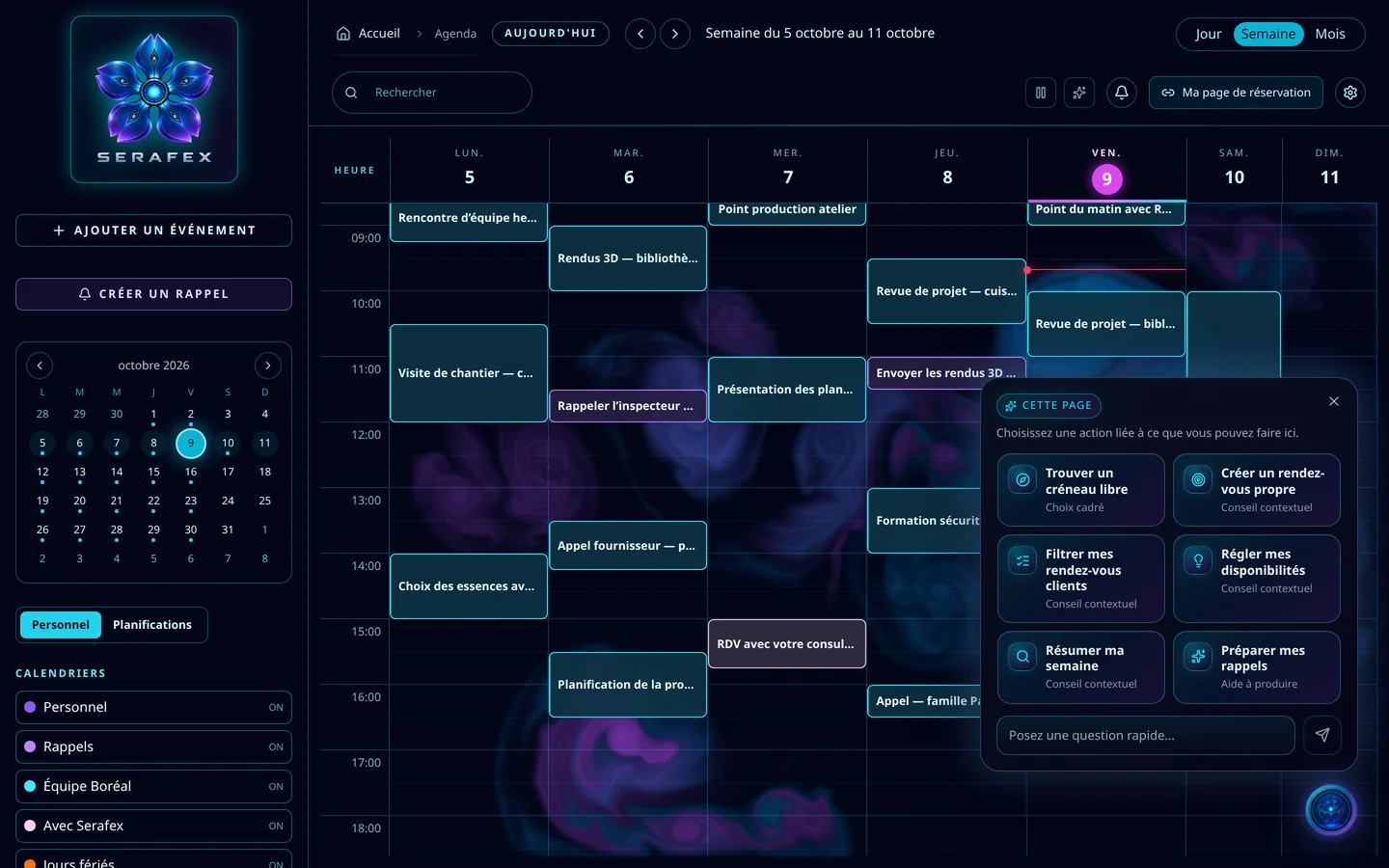
Demo screenshot, labels in French: Seraf’s “This page” panel open on the Calendar: find a free slot, create a clean appointment, filter my client meetings, set my availability, summarize my week, prepare my reminders.

A quick question, from any page

Seraf’s panel opens on the page you are on and suggests the moves that make sense there. On the Calendar: find a free slot, filter your client meetings, summarize your week. To go further, “continue in the big chat” opens the AI dashboard.

  • Six actions suggested for the page
  • A quick question at the bottom of the panel
  • The rest in the big chat

Discover: start from a goal

Not sure where to start? Discover suggests one idea at a time, then possibilities by area. Each idea comes with what to prepare and an example to adapt: it is placed in your conversation, you replace the parts in brackets, then you decide whether to send it.

  • Exploring uses no AI credit
  • An example to adapt, never sent without you
  • Possibilities based on your access and connections

A tour, with Seraf

Seraf can show you a page on the page itself: its cursor walks you through it, area by area, for example in Settings. It never presses Create, Save or Send for you, and your first click ends the tour.

  • Seraf’s cursor, area by area
  • A question about the current page
  • Your click takes back control

Seraf acts, you stay in control

When a request requires acting, Seraf shows you the action before doing it: you allow it once, or not. If it needs a detail, it asks you, with suggested answers. While it works, the progress stays visible at the bottom of the screen.

  • Allow this action once
  • Suggested answers to its questions
  • Progress at the bottom of the screen

02 · Section by section

Everything inside AI dashboard

Conversation

  • Recent and archived conversations
  • Search your conversations
  • Attachments and documents
  • Seraf’s model, conversation by conversation

Getting started

  • Discover: one idea at a time
  • Possibilities by area
  • Seraf usage guide
  • Set up your space with Seraf

While it works

  • Allow an action once
  • Questions and suggested answers
  • Progress at the bottom of the screen
  • Report a problem, with follow-up

03 · Seraf in this space

Seraf prepares, you confirm

Seraf keeps a personal memory and a company memory, each time with its source. When needed, it consults its Council, then gives you a recommendation, a reason and a next step. A deletion, an access change, a send or an action in an external tool always requires your explicit confirmation.

04 · Your account

Access and connections

The AI dashboard is part of the base plan. Serafex runs its own open models, such as Qwen and GPT-OSS; you can also connect your ChatGPT or your Claude in Settings › Connections, and the information Seraf processes with them then goes through that provider.

Included in the Executive planSee the plan →

06 · Next step

See Seraf at work on your own files

Tell us what is keeping your team busy this week. An advisor shows you, in the AI dashboard, how Seraf takes it on and what it puts in front of you before acting.

Opens the “Prepare a discovery call” form · no commitment